The VFX Compositing assignment for the first term of my second year at university was to plan, shoot, edit and render a composite shot of a three-dimensional remote-control car into a location from around campus. Overall, I’m very pleased with my final outcome, and thoroughly enjoyed the assignment. It was a first proper taste of what it would be like to work on a visual effects shot for a film.

The first stage was to decide on a location and collect all the relevant information. I chose a bench as I wanted the car to circle around and go underneath it. After setting up the Sony FS-7 camera and tripod, I identified a baseline and measured the dimensions of the bench and the distance from the camera to ends of the baseline. I then filmed a series of reference shots, using a chrome ball, grey ball and colour chart that I can refer to later in the process. Finally, I took a panoramic High Dynamic Range Image (HDRI). This involved taking a series of photos at a range of different exposures, at 60 degree intervals. These images were then stitched and combined using HDRI software PTGui. I created an undistorted version of the backplate footage using a 35mm Lens Grid to assist me with camera matching.
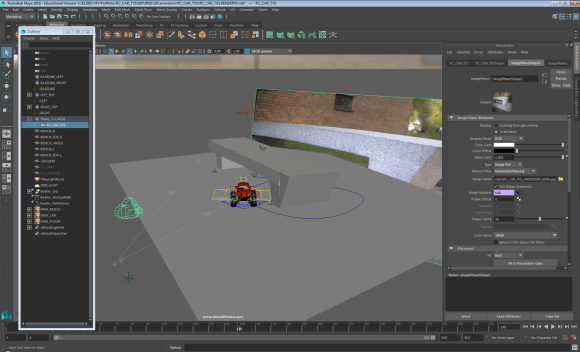
The next step of the process was to add the 3D car to the blank backplate that I filmed on location. In order to do this successfully, the dimensions and baseline measurements helped me to match the real life camera to a virtual camera in three-dimensional design software Maya. Once the cameras were lined up and matched, the rest of the bench geometry was then modelled. The car was then referenced into the design space and animated to follow a specific path through my scene, looping around and under the bench. Using VRay Object Properties enabled me to generate correct shadows for underneath the car, and the shadows that the bench would cast on the car itself. I then used two render layers to export a Beauty Pass and Shadows Pass.
The final stage was to composite the finished shot using Nuke. As well as the two render layers, I also exported a number of AOVs or render elements, including Reflections, Refractions, Specular, Lighting, Velocity and zDepth. These needed to be distorted to match the original backplate footage, before I built up the car element by element. The only task left was to render from Nuke to a HD 1920 x 1080 H.264 file.
Filming – Compositing – HDR Images – Network Rendering – Maya 2017 – NukeX – PTGui – Undistorting – Camera Matching – Animating – Keyframing – AOVs – Stitching Panoramas – Render Layers – VRay




 tobysanderson.co.uk